Wow (Wide Open West) Internet Report
WOW
When moving back to Chicago, we needed an internet provider, as one does, and
I’m working from home. This is not news. The interesting part of all of this is
that where we are in Oak Forest, IL (Chicago Suburb) there are 2 cable providers
that service our area. Comcast, and Wide Open West (WOW). After figuring out
which provider was connected to the house. We have had great service from WOW
for about 7 months, on my modem. Arris SB6190. I have and am now again very
happy with actual speed and response time (more important). Real speeds are at
500+ mbps down and 49+mbps up.
About March 12th I started seeing an increase in icmp (ping) packet loss to the
default WOW gateway. I’ve been watching this traffic for years on Comcast in
Indiana, and Time Warner in Texas. I use smokeping In a Docker container to
track nexthop and local traffic as well as reach-ability to my servers on vps
hosts. Back to the point (damn A.D.D). When responses to web traffic and other
uses of the net started to show an affected hiccup and slow response or timeouts
I called WOW. The 1st level support had me go through their script of rebooting
and checking browser caches. After explaining the problem, and the tech
investigating on their end, the correction was that I was using my own modem and
their are issues with it. They (WOW) could not access the firmware (docsis 3)
and had no insight into diagnostics. So with this, (which I do not believe to be
true but…) I went to their office and picked up a modem. Thinking I was doing
good by not needing a wifi phone cable router modem, I asked for the basic
modem. This was a two fold error as I was mistakenly given a modem that only
supports 100mbps. Yet on this modem as well I saw 50 to 70 % packet loss on
icmp. Again on the phone, and on their modem, I was scheduled for a priority
tech call on a Saturday. I was surprised by that. When the tech arrived, I’m
sorry I don’t remember his name, cause kudos are in order. The tech heard me out
and apparently by my knowledge and explanation, discerned that I knew a bit
about the technology and what was going on. He addressed the possible issue with
the connection termination of the rg6 cable (burrs and braid exposed) as well as
putting in a new (all the whistles) modem. We set it up in bridge mode after the
fact so it’s a modem with all disabled features. I was also informed that there
is code on the modem to inject into wow’s monitoring software to be proactive on
keeping the service level high. Yet I Still saw packet loss (fig 1) but actual
realization was not very apparent, No page timeouts or Netflix re-buffers,
etc..
So Now today Looking at the smokeping (fig 2) I see 0 packet loss and for the last 30 hours as well. 7-8 more days will show that trend. I believe there was an adjustment or code update that address the issue on my line after seeing the data from (Wow’s) Modem. There is also no corrected on the cable modem status (fig 3). Hopefully this will be the end of this issue.
Great price by the way (promotional) 500mbps / 50mbps $59 + cable modem $10 per month. + $10 per month after 1st year I believe
- 2018 07 24 Update All is still well and things are blazing fast. No desire for Comcast for anything.
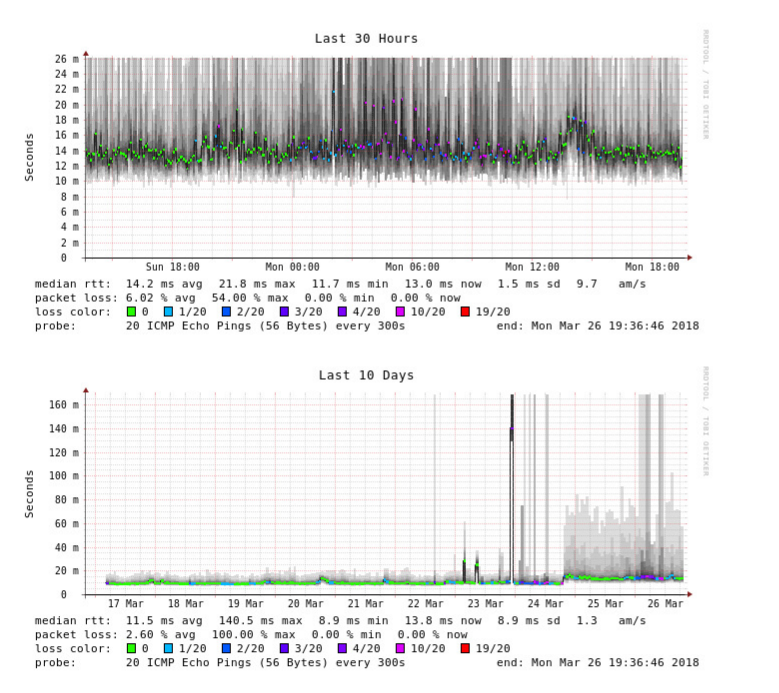
Figure 1: Figure 1
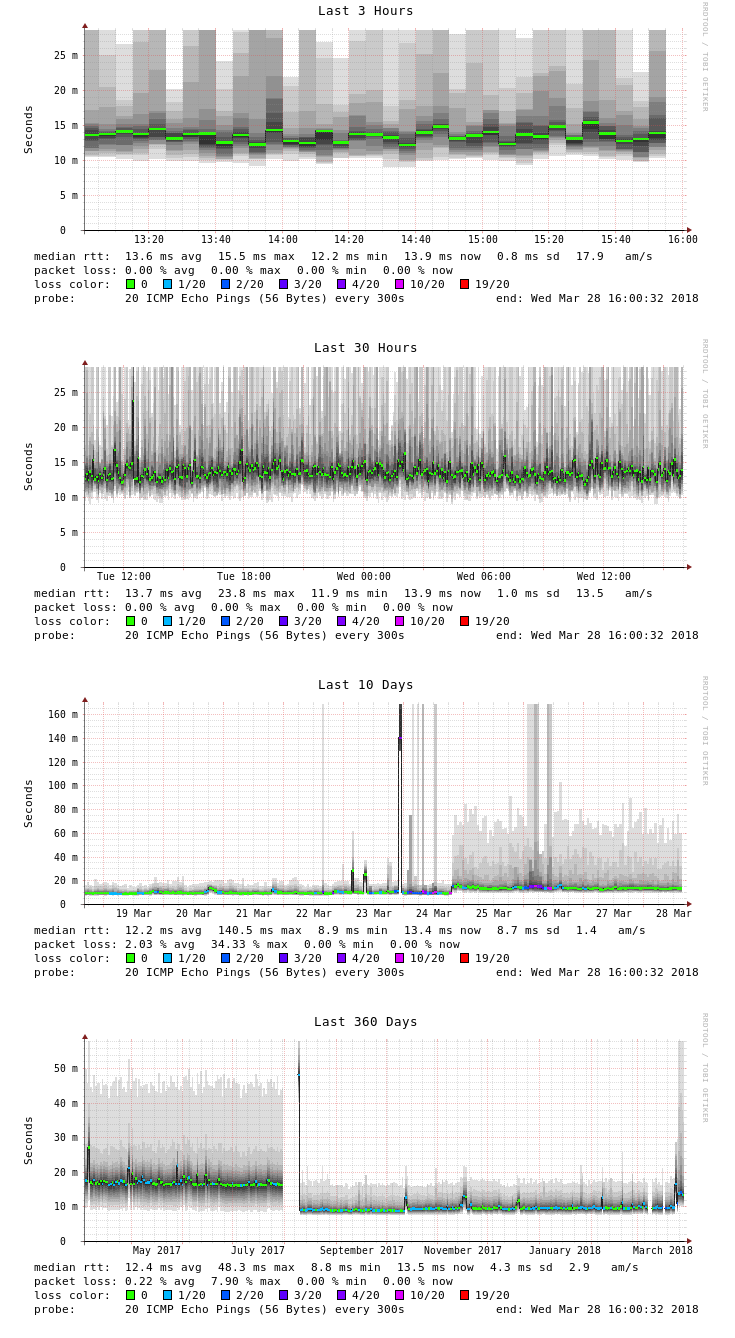
Figure 2: Figure 2
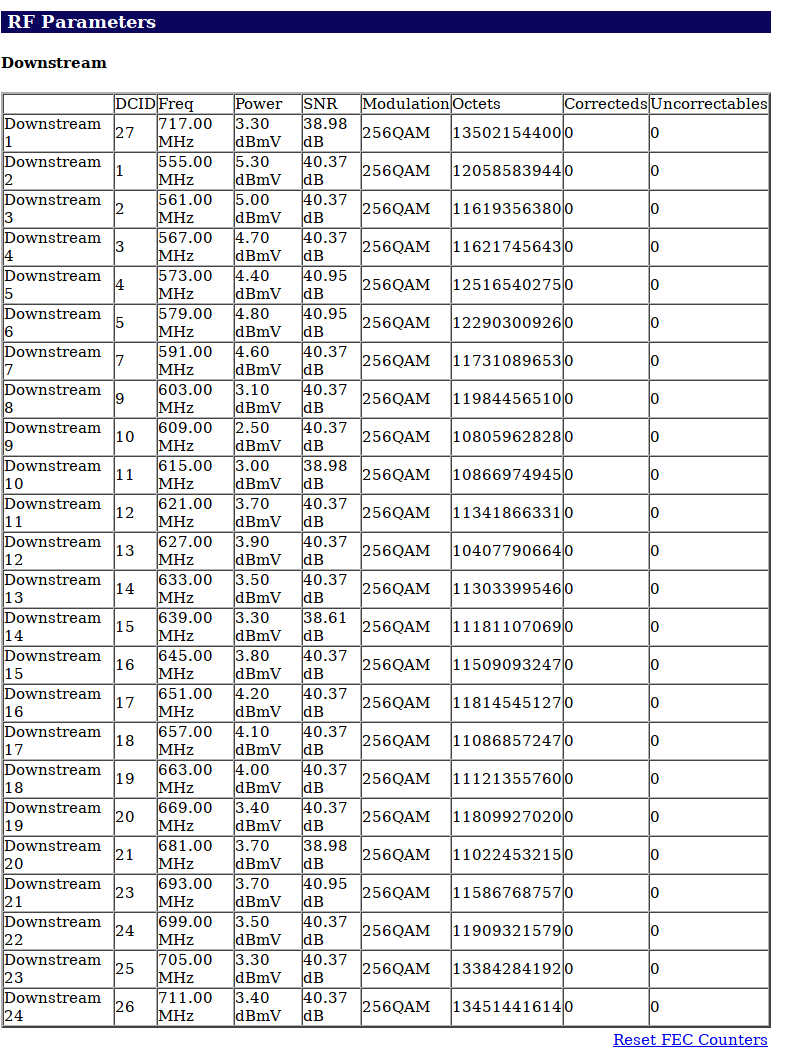
Figure 3: Figure 3